
Custom dictionary
When the built-in dictionaries get a word wrong, or you have your own terms — company names, product names, jargon — add them to the 自訂詞典 (custom dictionary). Your entries take precedence over the built-in dictionaries in both engines.
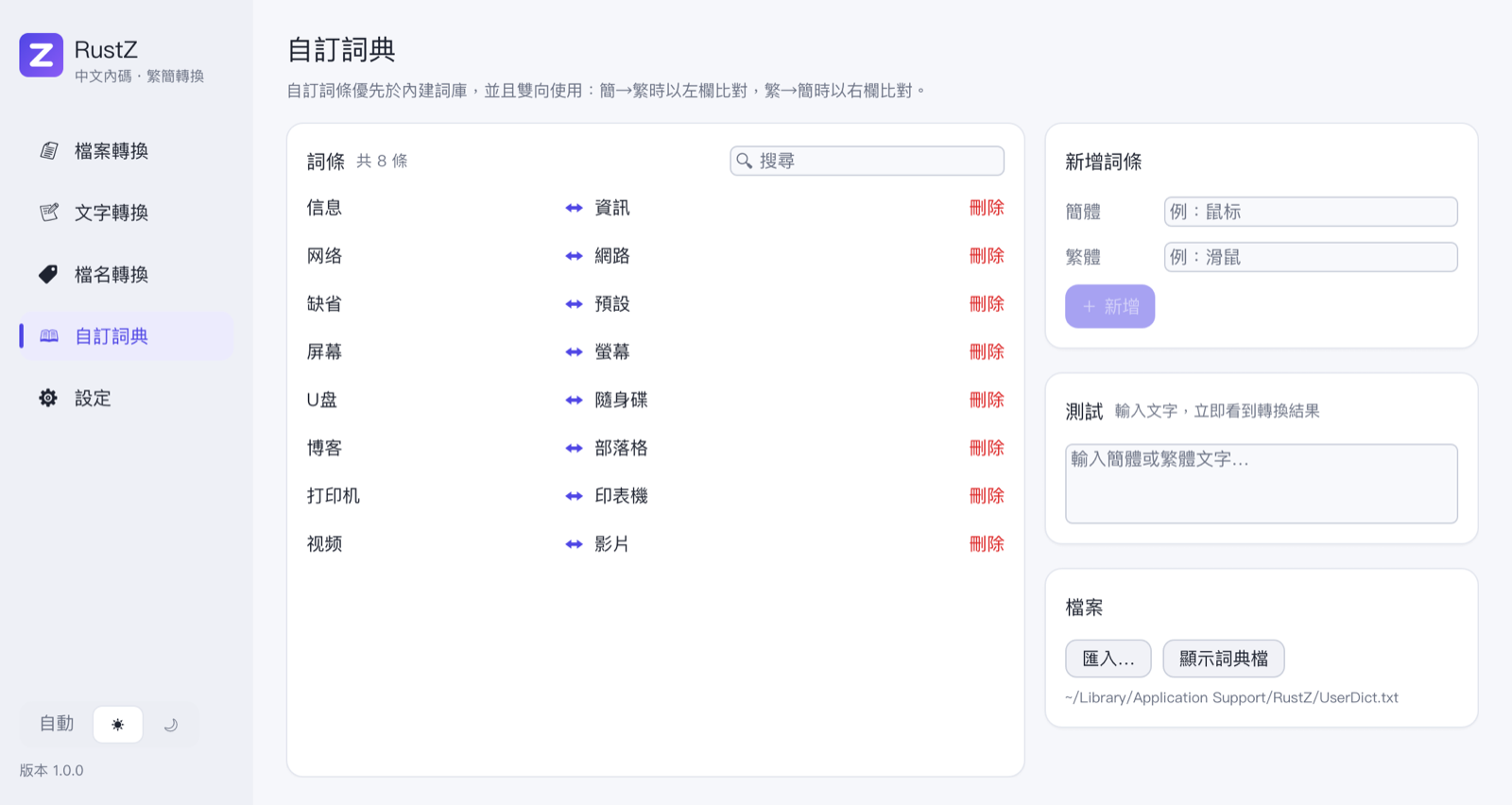
Both directions
Each entry is a pair, "Simplified ↔ Traditional":
- Converting to Traditional matches the left (Simplified) column and writes the right one.
- Converting to Simplified matches the right (Traditional) column and writes the left one.
Matching goes left to right and prefers the longest entry. A matched word is written as is and never passed to the built-in dictionaries.
Adding, searching, deleting
- Add: fill in 簡體 (Simplified) and 繁體 (Traditional) on the right and press + 新增 (Add). An existing entry with the same Simplified or Traditional word is replaced.
- Search: the search box above the list matches both columns.
- Delete: press 刪除 (Delete) at the end of an entry.
Changes are saved and take effect immediately; there is nothing to restart.
Testing
Type into 測試 (Test) on the right and both results appear below it — Simplified → Traditional and Traditional → Simplified — using the current engine settings and your dictionary, so you can see whether an entry works.
The dictionary file
The dictionary is a plain text file, UserDict.txt, in the same folder as the settings file (顯示詞典檔, Show file, opens it in your file manager):
# RustZ 自訂詞典:每行「簡體<TAB>繁體」,雙向使用,優先於內建詞庫。
视频	影片
打印机	印表機
博客 部落格- One entry per line, Simplified and Traditional separated by a tab (a comma also works).
- Lines starting with
#are comments. - The file may be UTF-8, Big5 or GBK; RustZ detects which.
Importing
匯入… (Import) merges a text file in the same format (.txt, .csv or .tsv) into your dictionary. Entries with the same Simplified word are replaced.
ConvertZ fix lists cannot be imported
ConvertZ's b5fix.dat and gbfix.dat map "text after conversion" to "corrected text", which is not the same as the custom dictionary's "Simplified ↔ Traditional". The fix lists built into ConvertZ 8.02 are already part of the ConvertZ engine — see Conversion engines.