
Conversion engines
RustZ has two engines for Traditional ⇄ Simplified conversion. Switch between them in Settings → Default conversion, or with /e:opencc and /e:convertz on the command line.
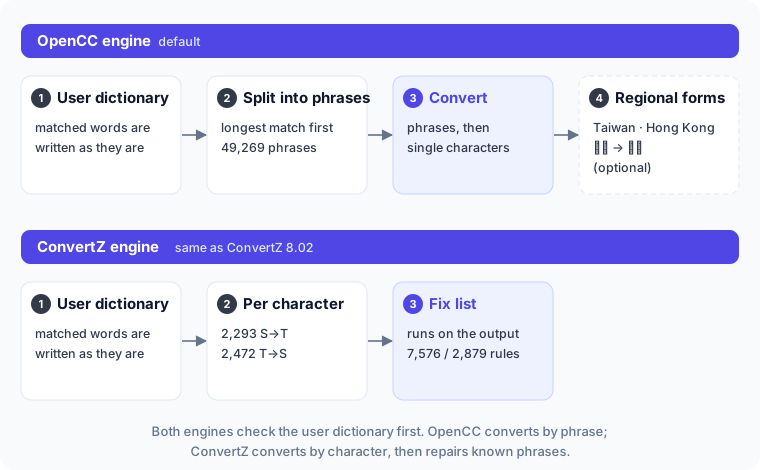
The custom dictionary comes first
Whichever engine you use, text is first matched against your custom dictionary — left to right, longest entry first. Matched words are written as they are; only the rest goes to the engine.
The OpenCC engine
The default engine uses the dictionaries from OpenCC 1.4.2 and converts the way OpenCC does:
- Segmentation: the text is split into segments by longest-phrase matching (STPhrases, 49,269 phrases, for Simplified → Traditional).
- Conversion chain: each segment passes through one or more dictionary groups; each group tries phrases first, then single characters.
| Direction | Glyph standard | Chain |
|---|---|---|
| S → T | OpenCC standard | phrases + characters |
| S → T | Taiwan | phrases + characters → Taiwan glyphs (裏 → 裡, 着 → 著…) |
| S → T | Taiwan + vocabulary | phrases + characters → Taiwan vocabulary and glyphs (软件 → 軟體) |
| S → T | Hong Kong | phrases + characters → Hong Kong glyphs |
| T → S | Taiwan (+ vocabulary) | undo Taiwan glyphs (and vocabulary) → phrases + characters |
| T → S | Hong Kong | undo Hong Kong glyphs → phrases + characters |
| T → S | OpenCC standard | phrases + characters |
For Traditional → Simplified, the glyph standard describes how the source text is written.
Examples:
| Input | OpenCC standard | Taiwan | Taiwan + vocabulary |
|---|---|---|---|
| 头发很长,发展很快 | 頭髮很長,發展很快 | 頭髮很長,發展很快 | 頭髮很長,發展很快 |
| 里面的软件 | 裏面的軟件 | 裡面的軟件 | 裡面的軟體 |
| 内存和鼠标 | 內存和鼠標 | 內存和鼠標 | 記憶體和滑鼠 |
The ConvertZ engine
This engine uses ConvertZ 8.02's data and converts the way ConvertZ did:
- Character by character: 2,293 characters for Simplified → Traditional and 2,472 for Traditional → Simplified, taken from the GBK ↔ Big5 table built into ConCmd.
- Fix lists: longest-match replacement on the converted text. The Traditional list has 7,576 rules and the Simplified list 2,879, from ConvertZ 8.02's built-in
BI_TradFix.datandBI_SimFix.dat.
The fix list matches the converted text, scans it once, and after a match continues right after the matched word. The example from ConCmd's manual:
| Fix list | Before (after per-character conversion) | After |
|---|---|---|
明了,明瞭 | 已經天明了。眾人明了他的處境。 | 已經天明瞭。眾人明瞭他的處境。 (the first one is wrong) |
plus 天明,天明 | same | 已經天明了。眾人明瞭他的處境。 |
An entry that "converts to itself" blocks a wrong fix — a trick the original fix lists use a lot, and RustZ keeps that behaviour.
Turn off 套用 ConvertZ 詞彙修正表 (Apply ConvertZ fix lists) for character-by-character conversion only.
Which one to use
| Situation | Suggestion |
|---|---|
| Simplified → Traditional as written in Taiwan | OpenCC, with Taiwan vocabulary on |
| Change the script only, keep the vocabulary | OpenCC, with Taiwan vocabulary off |
| Hong Kong usage | OpenCC, glyph standard Hong Kong |
| Output identical to ConvertZ | ConvertZ |
How "Auto" decides
With the script set to Auto (no /f: on the command line), RustZ converts only when needed:
- Writing Big5: Simplified → Traditional only when the source is not Big5 and the text has more Simplified-only characters (simplified forms that Big5 lacks) than Traditional-only ones (traditional forms that GB2312 lacks). A Traditional UTF-8 file written as Big5 is not "converted again".
- Writing GBK or HZ: Traditional → Simplified when the source is Big5 or the text has more Traditional-only characters.
- Anything else: the script is kept.
Choosing Traditional or Simplified always converts — except that a Big5 source is never converted to Traditional (it already is), and Simplified is ignored when writing Big5.